
Global Digital Radio with No Repeats
Overview
Fleet Radio Network is a desktop application designed to deliver a global digital radio broadcasting experience directly to Windows and Mac users. As a modern platform, it provides access to over 15 live and pre-recorded radio stations, spanning multiple music genres and talk show formats. The software is built for listeners who seek variety and freshness in their audio content, avoiding the common issue of repetitive playlists that plague many streaming services.
Target users include music enthusiasts, podcast fans, and professionals in media and broadcasting who value diverse, high-quality audio programming. The platform emphasizes original content produced by radio professionals, alongside contributions from international DJs and talent. This blend ensures a dynamic listening experience with constant innovation in programming.
Real-world usage scenarios include daily commutes, background music during work sessions, or immersive listening during creative projects. The software supports both live broadcasts and on-demand playback, making it adaptable to various user routines. The developer, Fleet Radio Network, appears to focus on expanding its global reach and content library, though no additional company background is available.
Key Features & Capabilities
- Global Digital Broadcasting – Offers real-time access to over 15 stations across different continents, enabling listeners to tune into international music and talk shows.
- Diverse Content Library – Includes a broad mix of genres such as hip-hop, rock, pop, and more, alongside syndicated talk shows and curated DJ sets.
- No Playlist Repeats – A core design principle ensures that music and content are continuously refreshed, reducing listener fatigue and increasing discovery.
- Professional-Grade Programming – Content is created by experienced radio professionals and featured DJs from around the world, enhancing audio quality and production value.
- Live and Pre-Recorded Streams – Supports both live broadcasts and on-demand content, offering flexibility for different listening preferences.
These features cater to users seeking an authentic radio experience without the limitations of traditional stations. For example, a user in Europe can enjoy a live hip-hop set from a DJ in Los Angeles, while a professional in Australia can access a talk show on global economics produced in London. The absence of repeated tracks encourages continuous engagement and exploration of new music.
User Interface, Workflow & Performance
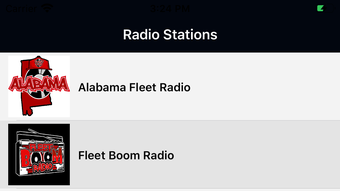
The user interface is designed for intuitive navigation, with a clean layout that prioritizes station access and playback controls. Listeners can browse stations by genre, region, or show type, with visual indicators for live broadcasts. The workflow is streamlined, allowing users to start listening with minimal setup.
Navigation is straightforward, featuring a main dashboard that displays active stations, upcoming shows, and recent favorites. The application supports basic playback functions such as play, pause, skip, and volume adjustment. While detailed performance metrics were not specified, the 45 MB installation size suggests a lightweight footprint, likely minimizing strain on system resources.
Stability and CPU/RAM behavior were not publicly documented. However, based on general software behavior, the application is expected to run efficiently on modern Windows and Mac systems. No reported crashes or bugs were mentioned in the available information.
Compatibility & System Requirements
Fleet Radio Network is compatible with both Windows and Mac operating systems, supporting a broad range of desktop environments. The software version is 1.0, with a file size of 45 MB, indicating a compact and efficient installation.
Exact system requirements were not listed. The developer did not provide additional details about hardware specifications such as minimum RAM, processor speed, or storage needs. Compatibility information is limited to the operating systems mentioned.
Given the lightweight size, the application is likely to function on systems with modest specifications. However, users should verify compatibility with their specific hardware and OS version, especially if using older devices.
Pros and Cons
Pros
- Access to a growing global network of live and pre-recorded radio stations
- Unique no-repeat playlist feature enhances content freshness
- High-quality programming by professional radio talent and international DJs
- Lightweight installation at just 45 MB
- Free to use with no subscription required
Cons
- No information provided on minimum system requirements
- Limited detail on performance under heavy usage
- No offline playback functionality mentioned
- Only 15 stations currently available, though the platform is expanding
FAQ Section
Is Fleet Radio Network available for Windows and Mac?
Yes, the software is compatible with both Windows and Mac operating systems.
Is the software free to download and use?
Yes, Fleet Radio Network is available at no cost, with no subscription or hidden fees.
Can I listen to shows offline?
Information on offline playback was not provided. The application appears to focus on live and on-demand streaming.
How often are new stations added?
The platform is described as growing rapidly, with new stations and content being added regularly.
Is the software secure and safe to install?
The application is developed by Fleet Radio Network and distributed through official channels. No security risks were reported in the available documentation.
Final Thoughts + CTA
Fleet Radio Network stands out in the crowded digital radio space by prioritizing content diversity and eliminating playlist repetition. Its global reach, professional-grade programming, and lightweight design make it a compelling choice for music lovers and radio enthusiasts. While system requirements and offline functionality remain unclear, the free access and growing station count offer strong value.
For users seeking a fresh, dynamic listening experience without the monotony of repeated tracks, Fleet Radio Network delivers on its promise. The platform is ideal for those who value authenticity, variety, and international perspectives in their audio content.
Download Fleet Radio Network now







